Showing posts with label online. Show all posts

Sunday, April 14, 2013

Engaging Science with Supercharged Science

Science isn't my strong point , it just isn't something I like studying or teaching. I took 2 years in high school (Biology and Chemistry) and then Computer Sciences in college so I understand it, just am not a huge fan, especially when the boys are younger. That is where Supercharged Science comes into play. We were given the opportunity to review the program and share our thoughts with our readers.

What is Supercharged Science?  An online video and audio based program to help making teaching science easy. The program is a subscription based program where each month you will gain access to new units in everything from Mechanics to Biology to Thermodynamics and all points in between.
How much does it cost? For $37 a month you will receive access to the k-8 e-science program complete with video lessons, experiments, audio lessons, worksheets, parent/ teacher guides, shopping lists for each unit and online support from what my boys call the Red headed Rocket Scientist.

.
Not only is this a great program to use as a stand alone science program. It is also a great supplemental program for an array of science curriculms

We did a couple of units over the review period. First we did sound which seemed natural especially for my youngest who loves anything Daddy does and Daddy does sound gear and speaker building. The boys made tin can telephones and took it a step farther by trying different size tin cans (Soup cans versus Coffee cans). Nathan has also been playing with glass bottles filled with various amounts of liquid creating various pitches. (it really has become a game for him)

We also have been enjoying the mechanics unit focusing on friction. Today at lunch they even experimented with moving something with straws (it was a stretch, but they kept talking about concepts they learned watching some of the videos)

Speaking of the videos , both boys have been watching the videos (together and separate). They have really enjoyed listening and watching Miss Aurora (as Nathan calls her). We have been alternating when and how they watch the videos (one day it will be separately the next time it will be together). This method seems to work best, especially if one of the boys wants to study something different.
Nathan also enjoyed listening to the audio lessons with the headset, he was able to listen without worrying about what everyone else in the room was doing and could listen even when Mommy was working on something else. He is my mostly motivated learner and if there is a subject he wants to know more about it is Science, this way he can watch and listen whenever he wants to as "extra-credit'. It fills the space he wants to fill in learning and gives him something to do that I don't worry about.
I love the extras with the program as well. including the math section, where they can learn different math skills in a very different environment.
I am not worried about what is being taught and am thankful for this product and the use we will continue to get from it. I am even looking forward to watching and doing a couple of the units when things settle down a bit in early summer. The boys have already asked when we can look at the Alternative Energy and Electronics units. They have gone through and made a list of units they want to work on over the summer when we relax a little and they can do more fun school.

We received a 1 year subscription to the program and I am looking forward to using this program more and more over the next 10 months. The Schoolhouse Review Crew mates share their opinions of this program HERE , where you can see how other moms and kids are using the program.


Sunday, October 28, 2012

Samson makes learning fun online #hsreviews


Have you met Samson?
Samson's Classroom is a fun interactive learning program focusing on Dolch sight words, spelling, and Reading with comprehension.
Sometimes I think I take our schooling too seriously, thankfully  Samson's Classroom is fun and silly engaging the boys without a lot of stress.
I started out with a single sign on  to give it a test drive myself and the boys, it didn't take long for them to ask for their own accounts. The idea that a single program can incorporate three critical areas of learning in one sure makes this Mom excited.
The prices for Samson's Classroom also excited this Mom. With packages starting at only $30 a year and a family package for $50 I can see the value as this trio of subjects really are critical to successes later in life. Since my oldest is inthe 4th grade, it isn't a program that I will continue much farther with him, but my 2nd grader engaged and enjoyed this program enough that I am seeing his attitude toward reading improve.

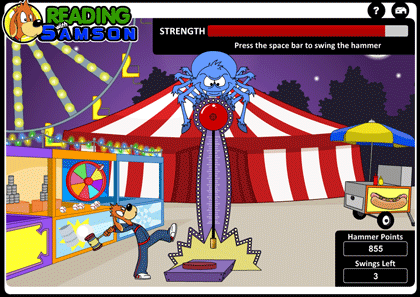
The games are colorful and fun as well as encouraging. The boys are eager to do the assignments to earn more chances with the games.

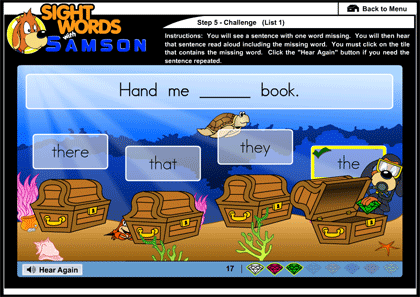
Sight word activities that teach listening and visual recognition also encourage more learning.

More games that encourage learning while improving computer skills.  This game in particular is challenge with the keyboard to move Samson around the board and once all the letters are collected  and arranged into the spelling words.

I know we as a family have been blessed by the change in attitude because of this program, a willingness to learn and enjoy the learning is a such passion for my husband and I.
Don't take my excitement for this program as the final word, check out what the rest of the crew thought, here


Photobucket
disclaimer: I received an online subscription to Samson's Classroom in exchange for my opinion here, no monetary compensation was received. 


Wednesday, September 12, 2012

Speekee TV agrega música a la escuela española #hsreviews


We have been looking for a Spanish program that the boys would enjoy for the last couple of years. We take a very relaxed approach to foreign languages right now, but still want them to be comfortable with the language. When we first heard about Speekee TV we thought it looked like fun, an immersion style program with lots of children and fun puppets.  The approach is relaxed in that it moves around changing locations with each video but maintains the immersion style teaching by only speaking Spanish.  The videos also show the English translation under each phrase helping the children make the connection. 
Speekee is full of colorful scenes and catchy tunes while teaching families basic Spanish.
Speekee TV is a series of 10 video episodes containing more than 2 hours of Spanish videos for the children and family to watch. The videos show Spanish children in various locations through out Spain and includes activity sheets and fun downloadable curriculum to reinforce the learning. 
We have enjoyed the videos, the boys like to watch the videos standing around the computer so they can move with the music. Not only does this help them remember what they are learning, they are using more of their scenes to gain more from each lesson. 
I really liked the weekly Fast Track emails giving me an idea of what was in this week's lessons. This helped incorporate the program into our school schedule without a lot of extra work for Mom. Both my boys enjoy the program without a lot of tweaking. The program is geared toward Elementary Ages, but younger children would also enjoy the fun puppet characters including Speekee. 
I appreciate the extras with Speekee including flashcards. One thing to consider, this is European Spanish and since it is based on Spain, the English translations are the Queen's English not American English. My oldest noticed a couple of words that didn't look right to him, that led to a wonderful conversation about how the English Language has been changed over the years.
Spanish ImmersionSpeekee TV is a subscription based program and sells for $7.50 a month that can be paid using PayPal or $60 for a full year. If you are interested in trying the program they offer a 2 week free trial, which will give you the opportunity to try it with your kids and see if it is a good fit. 

Photobucket
Check out what the rest of the Crew thought by clicking the button above

disclaimer: We received a subscription to Speekee TV as members of the SchoolhouseReview Crew in exchange for our honest review of the program.

Thursday, September 6, 2012

Reading is King with Reading Kingdom #hsreviews

As we began looking ahead to our fall term, I was looking for something that Nathan could do on his own to help his reading. He is an independent learner and often gets frustrated with Mom guiding him.
When Reading Kingdom came up to review on the Crew, I decided it couldn't hurt to give it a try. I had tried a demo previously and honestly couldn't remember what the boys thought of it (lame I know but I went through a period of trying everything I could get my hands on and not really keeping track of what was working)

Anyway, Nathan started out with the placement test and for whatever reason it placed him in a pre-reading level. I was like "No Way, something is up" and Nathan just walked away because it was too easy and in his words "Lame".  I emailed Reading Kingdom immediately to see what we could do, especially since he is reading at a mid range 1st grade level. I was happy to see that his level could easily be adjusted by the support staff, and we began out journey. About 3 sessions into I noticed Nathan getting frustrated with the amount of time given for a response. Since Mom is not suppose to help him I could only sit back and take notes. I decided to check into adjusting the time limit for answering questions, luckily there is a setting for just that and I was able to adjust it up so that he had a little longer to find the keys on the keyboard rather than using an online keyboard. He wants to type his answers but still struggles with letter placement on the keyboard. Now that we have fixed that issue, he works through his lessons and actually asks to do his lesson for the day and takes the initiative to go back and practice things he has issues with.
Now that I've shared our rough start and the excitement Nathan now has, lets take a look at the meat of the program.

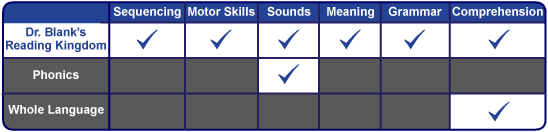
Reading Kingdom really covers it all as far as the skills involved in Reading and comprehension.

The program is interactive and visual allowing the student to be hands on with the keyboard as well as visual with the lesson seeing not only the words, but the activity that needs to be completed.

Reading Kingdom offers a great demo for 30 days free of charge. After the free period the program is a subscription based program for $19.99 a month ($199.99 a year) for the first reader on your account and $9.99 a month ($99.99 a year) for each additional reader. Supporting readers through grade 3, this program is fun and interactive and is really a great way to support independent learners on their journey.  Reading Kingdom also has books available as well as links to additional resources to support your reader.

Check out what the rest of the crew thought of this program
Photobucket


disclaimer: We received a subscription to the above program as members of the Schoolhouse Review Crew to use and share our opinions with our readers here. 

Thursday, August 16, 2012

How is your vocabulary? Could it use some help? Vocab Videos may be the answer. #hsreviews

Vocabulary is one of those subjects that while important seems to get little attention until you realize it is a HUGE part of the SATs or similar situation. Around here we have a joke with the boys, "Did you eat the dictionary for lunch again?". While we are usually kidding around with them, we try to incorporate words into lessons that they won't hear watching cartoons or on the playground. Sometimes it becomes a game to try and use the word in a sentence correctly, other times it just happens.

My husband is always amazed at the words the kids come up with for their focus, most of the time they are good words, but occasionally we have to have a talk about if a word is ok to use (especially if the meaning has changed over time.)
My husband and I decided to give Vocab Video a try for several reasons.
First, improve his vocabulary and second, introduce some new words to the boys in a different setting.
Let me start off by saying Vocab Video is a secular program and needs to be viewed as such. Parents need to watch each video to preview it before showing it to their children no matter what age the child.

Now that I have that out of the way, we found the comic relief reminiscent of 80's and 90's Saturday Night Live Episodes so for the adults in the house it was easy to watch and learn. I did sort through the videos and have our boys watch a couple of the episodes and they enjoyed the ones I let them watch. It also opened up some rather interesting conversations about situation appropriateness.

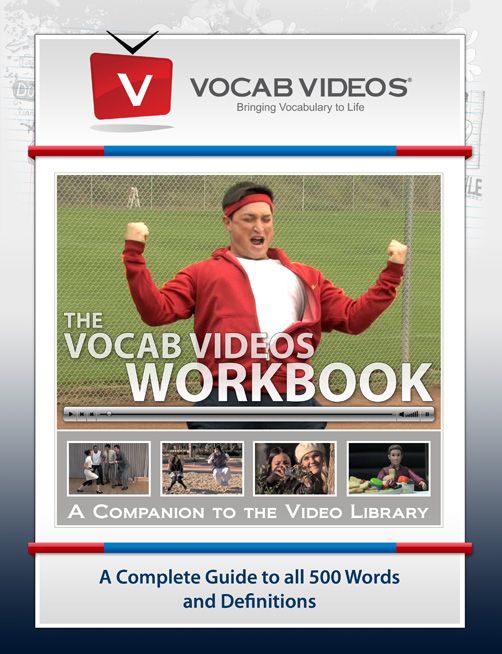
The workbook even has a comic appearance, which was perfect for my husband. He is taking steps to improve his education, which leads me to see our homeschool classroom as 2 elementary and 1 adult learner. We try and find activities that we can do together and this one is actually one of those activities.

Each student has their own account, but since we were working on this mostly as a family and I needed to have more controll over which videos they watch, I logged us on as a single person (usually my account).
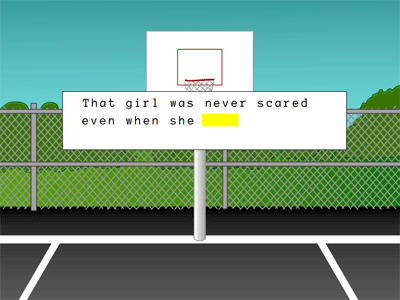
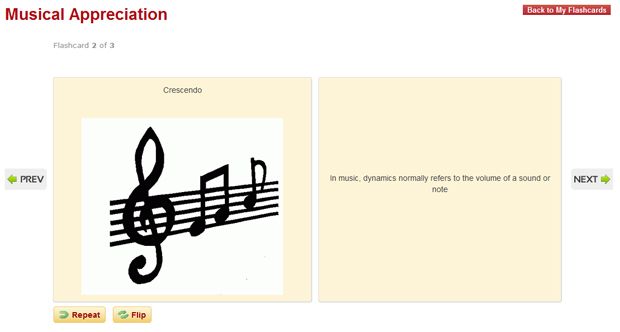
I found the flash card feature to be visually encouraging.
 The cards could be flipped on the screen and are clear images
Vocab Videos offers a variety of packages perfect for single to large families and even company programs. We received Small Educators Subscription  which retails for less than $80.00 for a 12 month subscription. With that subscription comes the teacher's dashboard where educators have access to a variety of downloadable resources, a view of the students progress, and completed student worksheets.
Overall the program is a good value, however since it was used for the adults, I think I would search for something a little different for the boys. If you have older children or adults in the family that are looking for a vocabulary program this could be a good option.
Check out what the rest of the crew thought of the program by clicking the button below.

Photobucket

disclaimer: We received a subscription to the above program as members of the Schoolhouse Review Crew in exchange for our honest review of the program .

Tuesday, August 14, 2012

This Week in History? A Thomas Jefferson Education can help answer that question. #hsreviews


homeschool review
Until recently we studied history in what I thought was an unusual way. I would go by major anniversary dates and plan unit studies around that. It was a lot of work searching for events and  such and matching up dates. Not anymore. Since I found A Thomas Jefferson   Education the boys and I can visit a huge variety of historical events with This Week in History.  I love that I get an email with a fun list of events and people to learn about.  Each week's email include links that we can use to explore people and places about the events. Over the last few weeks it has become a conversation starter, something like , "hey Mom, what happened this week?" , "let's look at see.." to the boys it isn't about traditional history it has become something unique to study.
For $9.95 a month you get a variety of interesting topics emailed as well as on their site complete with links to related activities and articles. I see the value in the program and if I had the budget for it, I would add it to our Homeschool curricula. 
Thomas Jefferson Education works on the premise that parents use the 7 keys of Teaching:
  1. Classics, Not Textbooks
  2. Mentors, Not Professors
  3. Inspire, Not Require
  4. Structure Time, Not Content
  5. Simplicity, Not Complexity
  6. Quality, Not Conformity
  7. You, Not Them
You can check out a sample of This week in History and see how it can benefit your homeschool.


disclaimer: As a member of the Schoolhouse Review Crew we received a subscription to the above mentioned program for free in exchange for our review.


Check out what the rest of the crew thought of this program.


Photobucket